


Filmm | Video Effects + Color
3.8132.00 Reviews
App Specs
- Version
- 1.0.30
- Updated On
- License
- Free
- Downloads
- 500,000+
- Developer
- Filmm
- Categories
- Video Players & Editors
- Platform
- Android
Screenshots


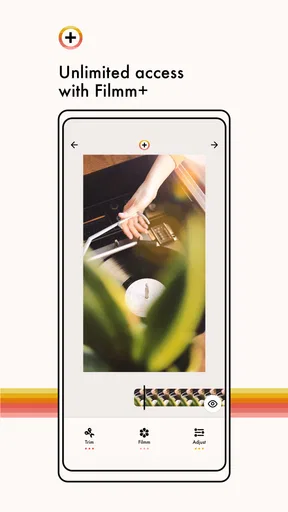
 Analysis by AppCompare
Filmm is the kind of video editor I reach for when a clean phone clip feels a little too clean. Rather than trying to replace a full editing suite, it focuses on visual atmosphere: textures, filters, and light leaks that can make ordinary footage feel more deliberate. My overall view is simple: Filmm works best as a finishing tool, not as an all-purpose video editor. If you want to give a short clip a mood before sharing it, it is approachable and enjoyable. If you need detailed cutting, sound work, captions, or serious color correction, you will probably outgrow it quickly.
That narrow purpose is also its appeal. The app comes from Filmm and sits in the video players and editors category, but its personality is closer to a visual styling kit than a traditional timeline editor. I found it most useful when I already had a clip I liked and wanted to change its feeling without spending a long time adjusting technical controls. It is free to install, rated for Everyone, and supports devices running Android 7.0 or later. Optional purchases range from $0.99 to $9.99 per item, so the basic entry point is easy, while the full creative range may involve spending more.
Where Filmm makes everyday footage feel intentional
I look at this section as a guide to choosing the right moment for a visual treatment: a clip that already communicates clearly can benefit from a little atmosphere, while an effect cannot repair confusing footage. I also consider whether a style will hold up across the whole sequence, not just in an appealing preview. That practical test leads naturally to the question of where Filmm offers the clearest advantage.
A focused approach instead of a crowded editing desk
Many mobile editors open with a busy workspace filled with trimming tools, stickers, music, transitions, text controls, and templates. That can be useful, but it also creates friction when I only want to change the look of a clip. Filmm takes a more focused route. Its central idea is visual treatment, and that makes the first decision easier: choose footage, explore a style, and judge whether the result matches the mood I had in mind.
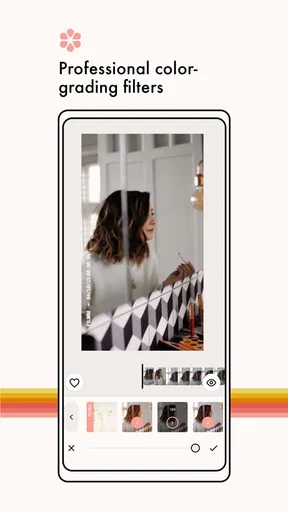
The emphasis on video filters is especially helpful for quick social posts, travel memories, food clips, and casual portraits. A filter can make a sequence feel warmer, darker, softer, or more stylized without requiring me to understand every part of color grading. The included textures and light leaks add another layer. Used carefully, they can give a static-looking shot a sense of movement or nostalgia. Used heavily, they can distract from the subject, so I treat them as seasoning rather than the main ingredient.
One of the better workflows is to begin with the least dramatic treatment and increase the visual intensity only when the footage still feels flat. This prevents a common mistake with effect-based editors: choosing the most obvious effect first and then trying to rescue the clip. With Filmm, I get better results when I ask what the video needs. A soft texture may help a quiet indoor scene, while a light leak may suit a quick outdoor montage. The effect should support the moment, not announce itself before the moment does.
A practical routine for a quick social clip
Imagine I have recorded a short sequence during a late afternoon walk. The original footage is usable, but the colors look ordinary and the separate shots do not feel connected. I would import the clips, apply a similar visual treatment across them, and compare the result with the unedited version before committing. That comparison matters because attractive effects can hide problems at first glance. A filter that looks good on one shot may make another shot too dark or push skin tones in an unflattering direction.
Worth Reading Before You Choose

EA SPORTS FC Mobile 26 Is a Bigger Football Game, but It Takes Time

Flipboard Shows What News Apps Must Do Beyond the Feed

Switching to Android Auto Means Rethinking Your Driving Routine

Google Calendar Makes a Crowded Week Easier to Manage

Ludo King Makes the Most of the Minutes Between Plans

Baby Panda World Brings Quick Play to Modern Phones, but Its Game Library Feels Busy
For a short post, I would keep the effect strength restrained, preview the complete sequence rather than isolated moments, and export only after checking the beginning and ending. The opening frame needs to look good immediately, while the final frame should not feel abruptly abandoned. This is a small habit, but it makes a noticeable difference when an effect changes the perceived brightness or color from one clip to the next.
Filmm is also useful when I want several unrelated clips to share a visual identity. A consistent treatment can make footage from different places feel like part of one small story. That is a stronger use of the app than applying a dramatic overlay to every shot. The app’s value is not simply that it can decorate video; it is that it can help establish a repeatable mood with less effort than manual adjustment.
The real strength is speed of visual experimentation
What impressed me most is the low commitment involved in trying an idea. I can test a texture, remove it, try a filter, and reconsider the light leak without turning the project into a technical exercise. This makes the app friendly to people who are creative but do not enjoy editing software. It also makes it a handy companion to a more capable editor: I can use Filmm to explore a look, then decide whether that look is worth rebuilding elsewhere with finer control.
That distinction is important. I would not choose it as my only tool for a longer project, but I would choose it when the visual finish is the main question. It is particularly suitable for a person who records frequently on a phone and wants a recognizable style without learning a complicated desktop workflow.
Three techniques that improve the result
First, I recommend judging an effect with the audio on, even though the app’s defining appeal is visual. A dramatic image can feel appropriate when viewed silently but clash with the rhythm or tone of the clip once sound is included in the wider project. If Filmm is only handling the visual treatment, I make the final decision while considering where the clip will be used.
Second, I avoid using a light leak at the most important visual moment. These overlays can be attractive, but if one crosses a face, product detail, sign, or action that the viewer needs to see, the effect becomes a problem. Placing the strongest visual treatment on a transition or less important beat usually gives the clip atmosphere without reducing clarity.
Third, I create a restrained version before making a bold version. The restrained copy becomes a useful fallback for different platforms or audiences. A look that works for a personal story may be too intense for a small business post, a family video, or a portfolio sample. Having two visual directions also makes it easier to compare style with substance instead of assuming that more texture means a better edit.
Where the experience becomes less convincing
The same specialization that makes Filmm approachable limits it. Filters, textures, and light leaks can change the surface of a clip, but they do not solve weak framing, shaky camera movement, poor timing, or unclear storytelling. I still need to choose good source footage. If the original video is badly exposed or the subject is lost in the frame, an effect may only make the weakness more noticeable.
I also find that effect-led editing can encourage indecision. When several looks are appealing, it is easy to keep previewing instead of finishing. My solution is to decide on the intended mood first and limit myself to a small shortlist. For example, I might choose between a clean film-like treatment, a textured nostalgic treatment, and a light-leak accent. That keeps the app from becoming an endless scroll through visual possibilities.
There is another trade-off for users who want precision. A dedicated editor is usually better when I need exact cuts, layered audio, detailed text placement, or a carefully matched grade across many scenes. Filmm’s strength is the quick visual decision, not the complete production pipeline. That means I would skip it as a primary choice for interviews, tutorials, product demonstrations, or any project where information must remain perfectly clear.
How it compares with familiar alternatives
Compared with a conventional mobile editor, Filmm feels less like a workstation and more like a style layer. A general editor is the better choice when I need to assemble a story from many clips, control timing precisely, add narration, or build a finished presentation. Filmm is the better choice when the structure is already simple and the main question is how the footage should feel.
Compared with applying a filter in a social media app, Filmm offers a more deliberate space for exploring the visual identity of a clip before posting. That can be useful when I want to prepare the same mood for different destinations rather than making the decision at the last step. The trade-off is that a social platform may be more convenient for a one-off post, especially when I do not care about developing a consistent look.
Compared with desktop color-grading software, Filmm is far less demanding and far less precise. I would not use it when accurate color matching is critical. I would use it when speed, experimentation, and a phone-first workflow matter more than granular control. These are not competing tools in every situation; they answer different editing questions.
Who should install it, and who should pass
I think Filmm is a good fit for casual creators, short-form video makers, travelers, students, and anyone who wants a recognizable visual mood without studying advanced editing. It is also useful for people who already have a main editor but want a fast way to test textures or light effects before building a final version elsewhere. Since it is free to start and suitable for Everyone, it is easy to try without making a large commitment.
I would be more cautious if you need a complete editor in one app. A person making regular instructional videos, detailed reviews, music edits, or multi-part stories will likely want stronger control over the timeline and supporting elements. I would also skip it if you dislike stylized overlays altogether. Its identity is built around visual effects, so someone seeking only clean trimming and correction may find the experience pointed in the wrong direction.
The app has reached over 500 thousand installs and holds a 3.8 average from around 3.5 thousand ratings, with 132 written reviews. I read that as a sign of a useful but taste-dependent tool: people who want this particular visual approach can get real value from it, while those expecting a broad editing suite may judge it more harshly. The current version is 1.0.30, and the free model makes experimentation straightforward, although individual in-app purchases can add up if I want to collect several styles.
My final take after using it as a finishing tool
Filmm is worth trying when your problem is mood, not mechanics. It gives ordinary phone footage a quicker path toward a chosen atmosphere, and its focus on textures, filters, and light leaks makes the creative decision feel less intimidating than opening a full editor. I especially like it for short clips where a consistent look matters more than complex construction.
My recommendation comes with a clear boundary. I would install it for visual experimentation, quick social content, and personal videos that need a little character. I would not rely on it alone for demanding projects, precise corrections, or edits built around detailed sound and timing. Used within that boundary, Filmm feels purposeful rather than incomplete. It does one part of video editing well: helping me decide what a clip should feel like before I share it.
For Android users on version 7.0 or newer, the free starting point makes the decision easy. Try it with a short clip you already know well, compare a subtle treatment against a bold one, and pay attention to whether the effect improves the subject or merely covers it. If the restrained version already makes the footage more coherent, the app is doing its job. If you keep wishing for deeper editing controls, that is the point to move to a broader alternative.
In my experience, that honest test captures the app better than any feature list. Filmm is not trying to be every video tool at once. It is a compact way to explore visual personality, and for the right creator, that focused purpose is exactly what makes it useful.
Pros
- Wide range of cinematic filters for quick video transformations.
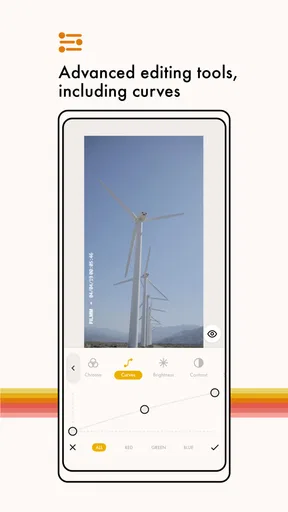
- Color adjustment tools offer more control than basic social editors.
- Effects can be previewed before applying them to a clip.
- Useful for creating visually consistent social media content.
- Simple interface makes basic editing approachable for beginners.
Cons
- Some premium effects and tools require a paid subscription.
- Heavy effects may increase export times on older devices.
- The app may reduce video quality when using certain export settings.
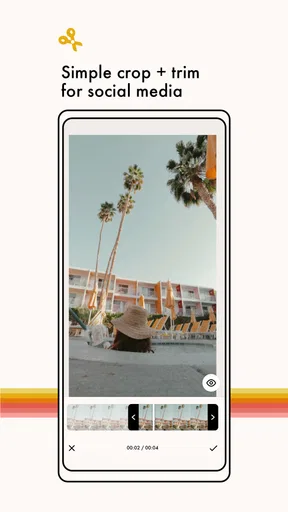
- Limited advanced editing features compared with full video editors.
- Large effect packs can take up considerable storage space.
FAQs for Filmm | Video Effects + Color
What is Filmm | Video Effects + Color used for?
Filmm | Video Effects + Color is a mobile video-editing app designed for creating stylized videos with cinematic filters, color adjustments, light leaks, dust, grain, VHS-inspired effects, borders, and other visual overlays. It is especially useful for social media creators who want to give ordinary clips a polished, nostalgic, film-like, or experimental appearance without using complex desktop editing software.
Is Filmm | Video Effects + Color free to download and use?
The app can generally be downloaded for free, but some effects, filters, editing tools, and creative packs may be restricted to a premium subscription or in-app purchase. The free version is useful for testing the interface and trying selected features, although exported videos may have limitations depending on the current version. Check the app store listing carefully for pricing, trial terms, and renewal conditions before subscribing.
Can I edit existing videos and photos, or does Filmm only record new content?
Filmm supports working with media already stored on your device, so you can import existing videos and, depending on the tool being used, photos for applying filters, textures, color treatments, and overlays. It may also provide camera-based creation features for recording content directly. Available editing options can vary between photos and videos, so some effects may work best with moving footage.
Does Filmm allow users to adjust colors and add film-style effects?
Yes. The app focuses heavily on visual styling, offering tools and presets intended to change the mood and texture of your footage. Users can typically combine color looks with grain, dust, scratches, light leaks, flicker, borders, and other analog-inspired details. These effects can be layered or adjusted to create anything from subtle cinematic grading to strong retro, VHS, disposable-camera, or music-video aesthetics.
Can videos edited in Filmm be exported and shared on social media?
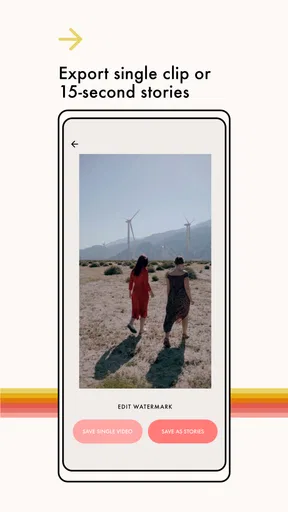
Edited projects can generally be saved to the device and shared through platforms such as Instagram, TikTok, YouTube, messaging apps, or other services that support video uploads. Export quality, resolution, frame-rate options, watermarks, and available formats may depend on the project settings and whether you use the free or premium version. It is worth checking the final preview before exporting to avoid unwanted cropping or excessive effects.


